n-tree
access to your world
Hardware
POS Solutions
Payment Machines
Readers & Terminals
Access Control
Locking Systems
Tickets
Software
Server
Till System
Back Office
Control System
Event Management
Pool Management
Card-Plattform

Control System


ACCESS Control | Control System

Control System ACCESS Control
Description

ACCESS Control is the application within the ACCESS product family which is responsible for controlling all card readers and terminals. It therefore forms the link between the ACCESS Engine and the individual entrance components.

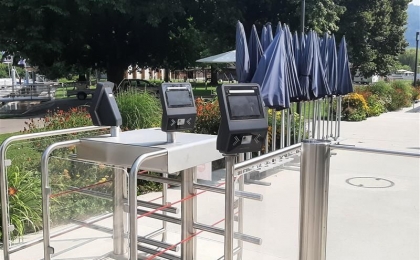
From controlling turnstiles, doors, card readers to solaria, whirlpools and token dispensing machines etc., ACCESS Control manages these processes quickly and securely. Tampering and misuse is successfully prevented by the automatic checks. Unpleasant situations which often arise when personal checks are carried out are avoided. All transactions are saved seamlessly and verifiably in the system and are available for discussion at any time, at the touch of a button.

The ACCESS Control user interface is designed so that all the important data is visible at a glance. If required, individual transactions can be displayed on the screen. Special tariffs are called up using special visuals (colour, ticket endorsements, photo displays, etc.). The utilisation of the individual areas of the facility are monitored using meters. The system prevents overcrowding of the facility and makes it possible to adapt all processes to the level of utilisation of the facility. Each individual turnstile and each terminal can be controlled centrally by ACCESS Control.

››   Download Data Sheet

Performance Characteristics

Control System ACCESS Control
Performance Characteristics ACCESS Control

››   Ticket authorisations
››   Freely definable authorisation models
››   Controls card readers and turnstiles
››   Controls terminals (solaria, whirlpools, vending machines etc.)
››   Displays the time remaining for booking terminals (Solaria, whirlpools etc.)
››   Displays device status
››   Display and control of operating direction and type (normal operation, indefinite, blocked and out of order)
››   Displays card type (e.g. no entry for adults with child tickets)
››   Displays ticket information with name and address
››   Displays number of points remaining
››   Displays error messages caused by invalid tickets
››   Displays the history of a ticket
››   Manual authorisation
››   Freely definable zones and area structures
››   Monitors the length of stay in individual zones (for precise calculation of post-payments)
››   System, guest and weight meters for each area, zone and passage
››   Prevents illegal overcrowding of parts of the facility
››   Prevents the transfer of tickets
››   Anti-pass-back control
››   Monitoring and photo display
››   Card readers and terminals are connected via RS422 or TCP/IP network

General Information

Control System ACCESS Control
Operating System

››   Microsoft Windows XP Professional
››   Microsoft Windows 2003 Server

Simplicity

››   Easy to use graphical user interface; users can
      react to any situation quickly and reliably.

Security

››   ACCESS Control offers a number of valuable
      security functions
››   ACCESS Control guarantees secure operation
      of the entire system - security regulations are
      upheld and tampering and misuse are
      prevented.

Scalability

››   The ACCESS product familiy has the right solution for all
      sizes of business; in its smallest configuration, the whole
      system can be used with one PC as a stand alone system.
››   The easy expansion of the system means that the facility
      can grow over time with the operator's demands.


Standardisation

››   The architecture of ACCESS Control using industry standards
      such as Microsoft Windows XP Professional has the advantage
      of offering all users a well- known environment.
››   ACCESS products can be optimally integrated into any IT
      environment.

Photographic verification

Kontrollsystem ACCESS Control
Identity validation for access control

A camera can be used to take a photograph of the cardholder when the card is purchased. The process of taking the photograph is simple and quick and can be repeated at any time. This photographic record permits, for example, long-term cardholders to be clearly identified at the cash desk. When the guest uses his ticket at entrance reader, the photograph on the card appears on the cash desk computer or checking monitor screen above the turnstile. Fraudulent attempts to use your facilities are thus greatly reduced by having these electronically stored photographs. Unauthorised passing on of season tickets, for example, is prevented and card misuse effectively stopped.
 
SitemapImprint
© n-tree solutions Ticketsysteme GmbH. 2010